
Even though BibDesk has a very useful “Cite Tray” from which you can drag and drop your citations to the document you’re writing, what I consistently end up doing is to use, always, mostly the same format. As an example, I may be saying something like as \citeauthor{Nott:2014} said so eloquently, “repetitions are a sign of laziness.” (\citeyear[10]{Nott:2010}) So in essence, I am dragging and dropping twice, and am then entering (or not) the page I’m quoting from. And as repetitions are obviously a sign of laziness in the sense that for just too long I’m too lazy to automate the process, it took me probably 5,000 citation marks until I decided to do this in a better way using a nice dialog box that fetches the relevant information from the currently selected article in BibDesk, asks for the page number and finally copies the correct citation key to the clipboard:
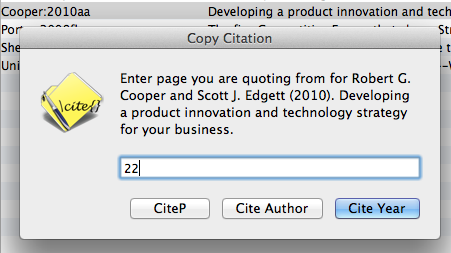
Here is the script (and here you can download it so that you can try it out directly; look inside the bundle for the source code):
(*
  This script copies the BibDesk citation key
*)

on run {}
	set message to ""

	tell application "BibDesk"
		activate
		set theBooks to the selection of document 1
		repeat with theBook in theBooks
			tell theBook
				set theAuthor to my cleanString(value of field "Author")
				set theYear to my cleanString(value of field "Year")
				set theTitle to my cleanString(value of field "Title")

				set dlg to ¬
					(display dialog ¬
						"Enter page you are quoting from for " & theAuthor & " (" & theYear & "). " & theTitle & ¬
						"." default answer "" buttons {"CiteP", "Cite Author", "Cite Year"} ¬
						default button 3 with icon 1 ¬
						with title "Copy Citation")

				set thePage to text returned of dlg

				if button returned of dlg is "CiteP" then
					if thePage = "" then
						set the clipboard to "\\citep{" & the cite key & "}"
					else
						set the clipboard to "\\citep[" & thePage & "]{" & the cite key & "}"
					end if
				else if button returned of dlg is "Cite Author" then
					if thePage = "" then
						set the clipboard to "\\citeauthor{" & the cite key & "}"
					else
						set the clipboard to "\\citeauthor[" & thePage & "]{" & the cite key & "}"
					end if
				else if button returned of dlg is "Cite Year" then
					if thePage = "" then
						set the clipboard to "(\\citeyear{" & the cite key & "})"
					else
						set the clipboard to "(\\citeyear[" & thePage & "]{" & the cite key & "})"
					end if
				end if
			end tell

		end repeat

	end tell
end run

on cleanString(aString)
	set result to aString
	set result to my ReplaceInString(result, "{", "")
	set result to my ReplaceInString(result, "}", "")
	set result to my ReplaceInString(result, "---", " - ")
	return result
end cleanString

on ReplaceInString(aString, oldStr, replStr)
	set newString to ""
	if aString is not "" then
		tell AppleScript
			set oldDelim to text item delimiters
			set text item delimiters to oldStr
			set foundList to text items of aString -- tokenise the string
			set text item delimiters to oldDelim
		end tell
		set n to count of foundList
		if n ≤ 1 then
			set newString to aString
		else
			set newString to (item 1 of foundList)
			repeat with i from 2 to n
				set newString to newString & replStr & (item i of foundList)
			end repeat
		end if
	end if
	return newString
end ReplaceInString
The AppleScript cannot compile. The applet Works, Applescript does not. Why?
default button 3 displayed publications 1 ¬ Expected “,” but found property.
“Expected “,” but found property.” Somehow downloaded package works, but the script doesn’t want to compile if copied and pasted to AppleScript editor.
Yes, my bad. There was my web editor replacing & by
&– and that messed up the script of course. I’ve fixed in, try again.