
So I’m playing around with Evernote and essentially don’t want to use Evernote as my “store it all” kind of document repository. DevonThink didn’t work out that well after all, and using Evernote that way seems to be equally inadequate. At the end of the day, I have a decent file system anyhow, so why should I decide to move all my files over there. Rather, I’d use Evernote for notes and stuff, as the name suggests.
One thing I like about Evernote is, of course, that it has files available on all devices. So one thing I’d like to do is to have things like the invoices I’m currently paying being in Evernote, while at the same time staying in my existing file system structure.
Therefore, I thought about setting up a folder which I anyway have and where I normally dump into all those invoices that I’m having to pay. My idea is to add some handler to that folder so that
- Whenever a file is added to that folder, it should be copied into some Evernote notebook
- Along with the actual file, I want to have a hyperlink in the Evernote note that will open the original file from the file system – thereby I can easily add comments to the file like “paid”
- When I eventually move the file from its original location to some target location in the file system, I want the link inside the Evernote note to still be pointing to the file – regardless of where it actually is (on the local file system).
- Obviously, I want the whole process be fully automatic – in other words, it should suffice to just drop a file into the folder, and I should never have to edit the hyperlink inside Evernote manually.
- Should I share the notebook, I don’t want those hyperlinks in those notes reveal any relevant information about my local file system structure.
Now having said that, this is obviously not only about some invoices, but it allows me to hold notes in Evernote notebooks (which I may also share), while at the same time being able to maintain my local file system structure, backup processes, etc. I just add Evernote on top, without losing control over the files. On the downside, whatever I add to Evernote will actually be stored twice (in Evernotes file repository as well as in the file system where I control it).
OK, so how do I achieve it? Using a simple Apple Script (see below) – and attaching that script to the folder using Hazel; I also use, optionally, Growl (automatically detected whether it is running by the script). Please bear with me – I significantly suck at writing Apple Script, so I’m pretty sure that any 9 year old can do that better. Yet it seems to work, so let’s go for it…
(*

	Append a file to Evernote as it is added to a folder

*)
use scripting additions
use framework "Quartz"

--
-- Configuration: Target Notebook
--
property theNotebook : "Rechnungen"

--
-- Configuration: Growl app Name and Notification Title
--
property theApp : "File Appender"
property theNotification : "File added"
property isGrowlRunning : false

--
-- Running from inside Script Editor
--
set theFile to choose file
my hazelProcessFile(theFile)


(*
  ======================================
  // Import the File
  ======================================
*)
on hazelProcessFile(theFile) -- , inputAttributes)
	my registerGrowl()

	set the aFilePath to theFile as text
	tell application "Finder" to set aFileName to name of alias aFilePath
	tell application "System Events" to set aFileURL to URL of alias aFilePath

	-- Utilize NSURL to get a persistent reference
	set aRef to current application's class "NSURL"'s URLWithString:aFileURL
	set aRef to aRef's fileReferenceURL()'s absoluteString() as text
	set aFileURL to aRef

	-- Display the file we are going to add
	displayMessage("Adding " & aFileName)

	tell application "Evernote"
		try
			-- Create a note with a dummy HTML, since file:// will be removed by Evernote at this stage
			set aNote to create note title aFileName with html "" & aFileName & "
" notebook theNotebook

			-- Get back the HTML Content of the newly created note
			set aNoteHTML to (HTML content of item 1 of aNote)

			-- Replace the dummy HTML by the link of to the file
			set aEditHTML to my replaceString(aNoteHTML, "http://www.google.com", aFileURL)

			-- Replace the HTML content into the note
			set (HTML content of item 1 of aNote) to aEditHTML

			-- Append the actual file to the note
			tell aNote to append attachment aFilePath
		on error error_message number error_number
			if the error_number is equal to 4 then
				displayMessage("Your Evernote account does not support the import of this type of file.")
			else
				displayMessage("Import into Evernote failed: " & "Error(" & error_number & "): " & error_message)
			end if
		end try
	end tell
end hazelProcessFile


(*
  ======================================
  // Display a Message
  ======================================
*)
on displayMessage(aMessage)
	if my isGrowlRunning then
		tell application id "com.Growl.GrowlHelperApp"
			notify with name theNotification title theNotification description aMessage application name theApp
		end tell
	else
		display alert theApp message aMessage as warning
	end if
end displayMessage


(*
  ======================================
  // Connect to Growl
  ======================================
*)
on registerGrowl()
	tell application "System Events"
		set isGrowlRunning to (count of (every process whose bundle identifier is "com.Growl.GrowlHelperApp")) > 0
	end tell

	if isGrowlRunning then
		tell application id "com.Growl.GrowlHelperApp"
			set the allNotificationsList to {theNotification}
			set the enabledNotificationsList to {theNotification}
			register as application theApp all notifications allNotificationsList default notifications enabledNotificationsList icon of application "Script Editor"
		end tell
	end if
end registerGrowl


(*
  ======================================
  // Replace String
  ======================================
*)
on replaceString(theString, theOriginalString, theNewString)
	set {od, AppleScript's text item delimiters} to {AppleScript's text item delimiters, theOriginalString}
	set theStringParts to text items of theString
	if (count of theStringParts) is greater than 1 then
		set theString to text item 1 of theStringParts as string
		repeat with eachPart in items 2 thru -1 of theStringParts
			set theString to theString & theNewString & eachPart as string
		end repeat
	end if
	set AppleScript's text item delimiters to od
	return theString
end replaceString
Now, I attach this script to my target folder using Hazel, like so:
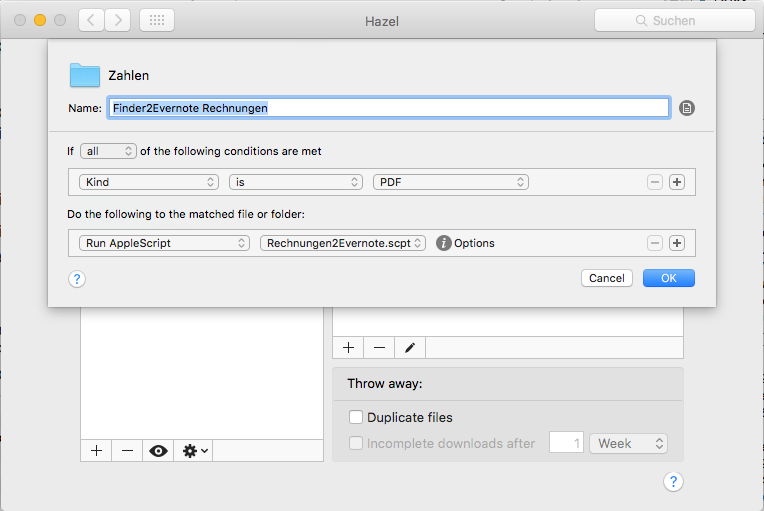
In the above I reference the script and also have a condition that I only want to use it for PDFs – that’s of course something that you may want to change. Similarly, what you see at the top of the script itself is that I set the name of the target notebook to “Rechnungen” (German for: “invoices”). That equally is something you may want to adapt.
Next, when I run the script, i can see that the file appears in Evernote:

Notice that at the top of the file, i have a hyperlink. When I go there with my cursor and hit Cmd+K for editing the hyperlink manually, I see something like this:
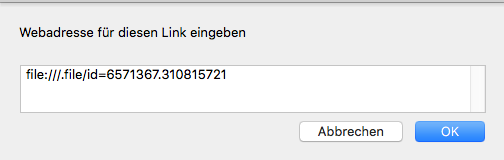
As you can see, there’s only a numeric ID in the link, which works on the local file system without revealing further information; the file system in turn will keep track of where that file actually is, so that if I move it around, the hyperlink still works.
This link is so persistent that I can even move the file around from the command line, in other words, it’s perfect for my purposes.
Note: Apple says that “although they are safe to use while your app is running, file reference URLs are not safe to store and reuse between launches of your app because a file’s ID may change if the system is rebooted,” I haven’t had that problem yet. So for my purposes, it seems to work well.

1 Response
[…] How to create Persistent File Links from Evernote to the Filesystem […]